Driver Type
Categories
- Recent Updates
- Access Control
- Amplifier
- A/V Receiver
- Climate and Pool Control
- Disc Player / Changer
- Display
- DSP
- DVR
- Irrigation / Sprinklers
- Lighting Control
- Matrix Switch
- Media Server and Player
- Multi-Room A/V
- Networking
- Power and Rack Management
- Security
- Surveillance
- Teleconferencing
- Training
- Tuner
- Utility
- Video Projector
Driver Type
Categories
- Recent Updates
- Access Control
- Amplifier
- A/V Receiver
- Climate and Pool Control
- Disc Player / Changer
- Display
- DSP
- DVR
- Irrigation / Sprinklers
- Lighting Control
- Matrix Switch
- Media Server and Player
- Multi-Room A/V
- Networking
- Power and Rack Management
- Security
- Surveillance
- Teleconferencing
- Training
- Tuner
- Utility
- Video Projector
Tesla Wall Connector WebObject Monitor
By: David Bowdler
Updated: June 22, 2026
Version: 0.11
Tesla Wall Connector WebObject Monitor
Put a live picture of home charging on the RTI panel. This driver reads a Gen 3 Tesla Wall Connector across the home network and publishes what it sees — whether a car is plugged in, how fast it is charging, energy added, running temperatures, and lifetime counters — as RTI variables and events. Up to four chargers are monitored from a single driver instance, with a whole-site summary alongside the per-charger detail. A built-in Web Object dashboard, hosted directly on the RTI processor, visualises each connector in real time with colour-coded state. Works over the local network with no cloud account required. Applies to the Gen 3 Wall Connector (the Wi-Fi model with the small front display, released from 2020). Not affiliated with or authorised by Tesla, Inc.; it reads a local device API that is undocumented and may change with firmware updates, and offers monitoring only — no local charge control is available.
Watch the Demo
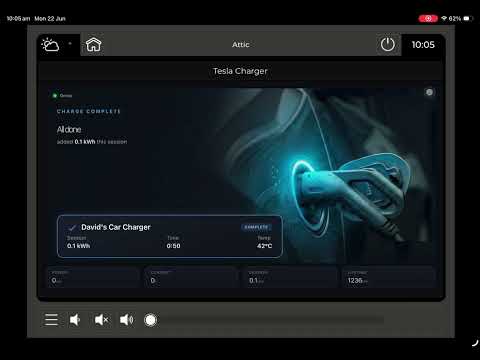
▶ Watch a full charge cycle on the live dashboard (YouTube)
Key Features
- Live charging status: Per-charger one-line status text, plugged-in/charging/charge-complete boolean flags, and contactor state — updated every poll cycle
- Power and energy: Real-time charging power (W and kW), session energy accumulated (kWh), session elapsed time, and grid voltage and frequency
- Temperature monitoring: Handle, PCBA, and MCU temperatures with a configurable thermal-warning threshold that fires an RTI event when exceeded
- Fault detection: Faulted flag, alert count, and alert text from the charger's own alert list — edge-fired Fault and Fault Cleared events trigger RTI macros automatically
- Lifetime statistics: Energy delivered (kWh), charge starts, connector cycles, contactor cycles, thermal foldbacks, and cumulative charging time — per charger
- Up to four chargers: Each configured by IP address and friendly name, with a full variable set per charger (Charger 1–4)
- Whole-site summary: Total power, total session and lifetime energy, online and charging counts, plus Any Charging and Any Fault booleans for site-wide automations
- RTI events and macro triggers: Vehicle connected/disconnected, charging started/stopped, charge complete, fault raised/cleared, over-temperature/normal, and online/offline — per charger and site-wide
- Built-in Web Object dashboard: Hosted on the RTI processor — a colour-coded connector graphic (red idle, amber plugged, green pulsing while charging, blue complete, red flashing on fault) plus power, session energy, and temperature readouts
- Temperature display units: Celsius or Fahrenheit selectable in Advanced settings; the thermal trip threshold stays in Celsius
- Telnet debug console for live diagnostics, and per-charger identity (firmware, part number, serial number)
Requirements
- Tesla Wall Connector Gen 3 (Wi-Fi model with the small front display, manufactured from 2020 onwards)
- RTI XP processor (runtime 24+, Integration Designer 11.4+, Apex 11.4+)
- Each Wall Connector on a fixed IP address (use a DHCP reservation — the driver cannot resolve .local hostnames)
- Local network access from the RTI processor to the Wall Connector (plain HTTP, no authentication required)
- The Wall Connector local API is undocumented and may change with Tesla firmware updates
How It Works
Enter each Wall Connector's IP address and a friendly label in Driver Properties. The driver polls each charger's local HTTP endpoints every few seconds — no Tesla account, no cloud connection, no authentication token. On every poll it updates RTI system variables for status, power, energy, temperatures, and lifetime counters, and fires edge-triggered events whenever a state changes. Those events trigger any RTI macro — dim the lights when charging starts, send a notification when charge is complete, or log a fault to a display. Add the built-in dashboard as a Web Object widget pointed at http://<processor-IP>:9063/.
Tesla Wall Connector WebObject Monitor
Version 0.11
Put a live picture of home charging on the RTI panel. This driver reads a Gen 3 Tesla Wall Connector across the home network and publishes what it sees - whether a car is plugged in, how fast it is charging, energy added, running temperatures and the lifetime counters - as RTI variables and events. Bind those to buttons, gauges, layers and macros, or drop the built-in Web Object dashboard onto a page for an at-a-glance view. A single instance handles up to four chargers and rolls them into a whole-home summary.
Before you start
- Monitor, not control. There is no local command channel for the Wall Connector, so the driver reports on charging but cannot begin, stop or throttle it. Everything here is read-only.
- It needs the Wi-Fi (Gen 3) unit. Only the late-2020-onward Wall Connector with built-in Wi-Fi answers on the local network. Earlier units, and any without a network radio, give the driver nothing to talk to and will not work - there is no cloud route either. Quick check: a Gen 3 shows up as a device in the Tesla app with its own firmware version, and its commissioning made you join a "TeslaWallConnector_XXXXXX" hotspot. If that is not your unit, it is the older type.
- The charger sees its own side only. A Wall Connector knows what it is doing but never learns the car's battery level. "Charge complete" here means the unit stopped delivering power while the cable was still connected - the real-world "it has finished" cue - not a percentage from the vehicle.
- Unofficial data feed. This local interface is not a published Tesla product and may shift with a future charger firmware release. Prove it works on your own hardware during the free 120-minute trial before buying a licence.
- Independent product; not connected with, sponsored by or approved by Tesla, Inc. "Tesla" and "Wall Connector" are used only to describe what the driver talks to.
What you need
- A Gen 3 Tesla Wall Connector (the Wi-Fi model with the small front display).
- Network reachability between the RTI processor and each charger.
- A fixed address per charger - set a DHCP reservation on the router. The driver is handed the IP directly, because RTI cannot look up the charger's ".local" name.
Getting it running
1. Add the driver to the project and assign it to the processor on the chargers' network.
2. In Driver Properties, choose how many chargers to watch and fill in each one's IP address and a label.
3. Adjust the refresh rates if you wish - live data defaults to every 5 seconds, lifetime counters to every 60.
4. For paid use, paste a licence key; otherwise the driver runs a 120-minute trial on each load. Once the trial ends, monitoring pauses (each charger reads "Licence required") until a key is entered, then picks straight back up. A key is per processor and covers every charger on it - copy the value from the MAC For Key variable and buy at smarthomeprogramming.com.au/store/.
5. Place each charger into its room as a source, using the name you set above.
Variables and events
Per charger you get a one-line Status, separate flags for plugged-in / charging / complete, live power and current, this-session energy and elapsed time, grid voltage and frequency, the three on-board temperatures with a thermal-warning flag, fault state with alert text, the slow lifetime counters, and identity (firmware, part, serial). A whole-home group adds total power, total session and lifetime energy, the online and charging counts, and any-charging / any-fault flags.
Events fire on the transitions worth automating against - plugged in and unplugged, charging started and stopped, charge finished, fault raised and cleared, temperature high and back to normal, online and offline - each per charger, plus site-wide roll-ups. Charging Complete is a useful one to hang an announcement or light cue on; Over Temperature gives an early heads-up, as the Gen 3 runs warm under load.
Temperature units
Driver Properties > Advanced offers a Celsius / Fahrenheit choice that sets how the handle, board and controller temperatures read on screen. The thermal trip point you enter stays in Celsius whichever display unit you pick.
The dashboard
The processor serves its own page - aim a Web Object at http://<processor-IP>:9063/ for a tile per charger and the home totals (the port and an on/off switch sit under Driver Properties > Web Object). The connector graphic recolours with state so it reads from across the room: steady red when idle, amber once plugged in, a green pulse while charging, blue when finished, and a red flash on a fault. Tick the cloud option to reach the same view off-site as well.
If something looks off
- Stuck on Offline: re-check the IP, ping the charger, and confirm it is the Wi-Fi Gen 3 with a reserved address.
- Readings look wrong after a Tesla update: the feed is unofficial and may have moved - get in touch.
- A telnet diagnostics console is on port 12510 (type "help").
Help
Smart Home Programming - smarthomeprogramming.com.au
This driver requires a licence key tied to your RTI processor's MAC address.
- Free trial: a fully functional 120-minute trial runs on every load — no key needed, so you can prove it on your own charger before buying.
- Per processor: one licence key per RTI processor, and it covers every Wall Connector monitored from that processor.
- Purchase: buy a key at https://smarthomeprogramming.com.au/store/ — enter your processor's MAC (shown in the driver's MAC For Key variable) and the key is generated instantly.